New Touchscreen MacBook Pro: 7 Stunning OLED Upgrades
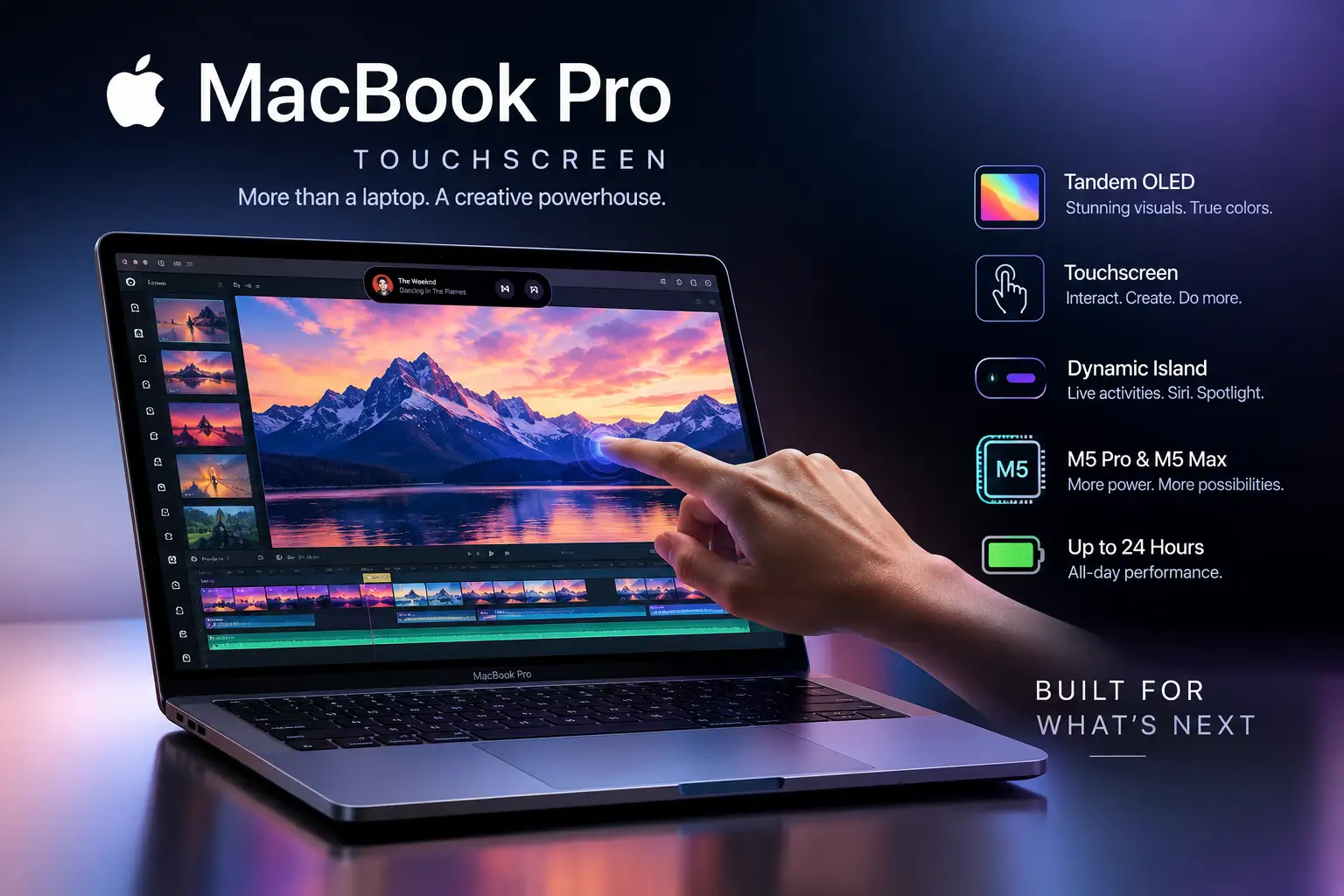
Apple has introduced a new MacBook Pro with a touchscreen, tandem OLED display, Dynamic Island, and M5 Pro and M5 Max chips. Announced on October 28, 2026, the redesigned laptop is available in 14-inch and 16-inch sizes, with US starting prices of $2,899 and $3,399 for the M5 Pro configurations. Pre-orders opened on October 28, and availability begins November 6, 2026.
The biggest change is that Apple has finally brought touch input to the MacBook Pro. The new PROLED XDR display also promises up to 2,000 nits of peak brightness, a 120Hz adaptive refresh rate, and a 10,000,000:1 contrast ratio. These upgrades target photographers, video editors, designers, developers, and other professionals who need a powerful portable workstation.
But is the new touchscreen MacBook Pro worth its premium price? Here are the seven biggest upgrades, confirmed specifications, US prices, and the key things you should consider before buying.
Quick answer: The new touchscreen MacBook Pro is Apple’s premium professional laptop featuring tandem OLED technology, touch controls, Dynamic Island, M5 Pro or M5 Max performance, and up to 24 hours of claimed battery life. It is most appealing to creative professionals who can benefit from its display and touch-enabled workflows. Everyday users may not need to spend this much.
New Touchscreen MacBook Pro: Key Specifications
Apple’s new MacBook Pro combines a redesigned display with existing M5 Pro and M5 Max processor families. The following specifications are based on Apple’s official announcement.
| Specification | Confirmed details |
|---|---|
| Product name | MacBook Pro with PROLED XDR Display |
| Announcement date | October 28, 2026 |
| Display sizes | 14.2-inch and 16.3-inch |
| Display technology | Tandem OLED |
| Touchscreen | Yes |
| Refresh rate | Adaptive 10Hz–120Hz |
| Peak brightness | Up to 2,000 nits |
| Contrast ratio | 10,000,000:1 |
| Processor options | Apple M5 Pro and M5 Max |
| Maximum unified memory | Up to 128GB |
| Maximum configurable storage | Up to 16TB |
| Advertised battery life | Up to 24 hours |
| Operating system | macOS 27 |
| Wireless connectivity | Wi-Fi 7 and Bluetooth 6 |
| Ports | Three Thunderbolt 5 ports, HDMI, SDXC, MagSafe, and headphone jack |
| US starting price | $2,899 |
| Availability begins | November 6, 2026 |
Source: Apple’s official MacBook Pro announcement.
1. Tandem OLED Display Delivers a Major Visual Upgrade
The new PROLED XDR display is one of the most important upgrades in the touchscreen MacBook Pro. It uses tandem OLED technology, which places two self-emissive pixel layers together to improve brightness and display performance.
Unlike a conventional LCD, OLED pixels can control their own light. This allows the display to produce deep blacks, strong contrast, and detailed highlights in supported content.
Apple lists the following display capabilities:
Up to 2,000 nits of peak HDR and SDR brightness.
A 10,000,000:1 contrast ratio.
An adaptive refresh rate of up to 120Hz.
Support for both P3 and Adobe RGB color spaces.
An optional nano-texture finish to reduce reflections.
These specifications could make the new MacBook Pro particularly attractive to photographers, filmmakers, graphic designers, and colorists.
For example, a photographer editing a high-contrast image could benefit from deeper blacks and detailed highlights. A video editor working with HDR footage could also benefit from the display’s brightness and color capabilities.
However, impressive specifications do not automatically guarantee better results in every workflow. Professional users should still consider calibration, their preferred reference standards, application support, and actual display testing.
2. Apple Finally Brings Touchscreen Controls to MacBook Pro
The headline feature is the touchscreen. For the first time, Apple has introduced touch input on the MacBook Pro, allowing users to interact directly with content on the display.
The touchscreen supports familiar actions, including:
Swiping through webpages and documents.
Pinching to zoom into photographs.
Dragging and dropping presentation slides.
Moving and arranging windows with touch gestures.
Interacting directly with creative tools and on-screen controls.
Apple says the touch sensor is built directly into the display panel rather than being placed on top of it, helping reduce the distance between your finger and the displayed content.
The feature could be especially useful when editing images, selecting objects, manipulating 3D models, or adjusting a video timeline. Instead of relying entirely on a trackpad, you can interact with certain elements directly.
Importantly, the touchscreen does not replace the keyboard or trackpad. Apple designed it to work alongside existing input methods, allowing you to choose whichever method is more convenient for a particular task.
That distinction matters. A touchscreen is potentially valuable for creative work, but it will not necessarily make typing, programming, or spreadsheet navigation faster for every user.
3. Dynamic Island Comes to MacBook Pro
Another notable addition is Dynamic Island, which Apple is bringing to the Mac.
On the new MacBook Pro, Dynamic Island serves as an interactive area for Spotlight, Live Activities, and Siri AI. It gives users a place to access certain information and actions without navigating through multiple windows.
According to Apple, supported interactions include searching the Mac, checking real-time updates, controlling music, and interacting with calls or AirDrop requests.
The feature could make everyday tasks more convenient by keeping frequently used information within easy reach.
For example, you might check an ongoing activity or control music while continuing to work on a document. With Siri AI, you can also access supported assistant features from this area.
However, Dynamic Island is not a replacement for the entire macOS interface. Its usefulness will depend on how well supported applications and system features integrate with it.
4. M5 Pro and M5 Max Power Demanding Professional Workflows
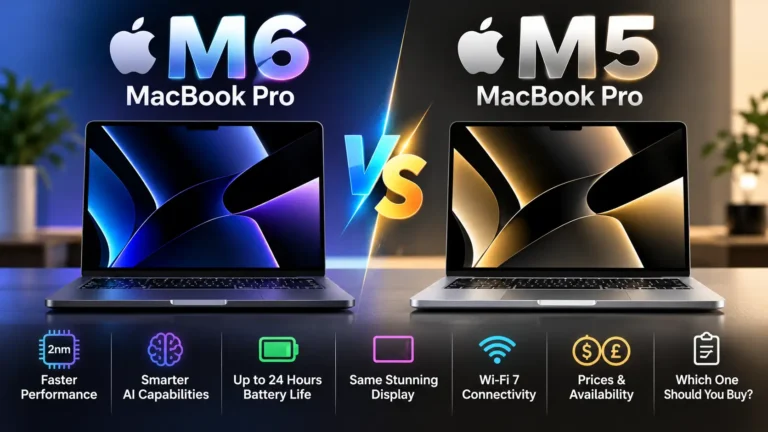
Despite the major display redesign, Apple has not introduced an M6 processor in these touchscreen models. They use the M5 Pro and M5 Max chips.
That distinction is important because Apple also announced a separate 14-inch MacBook Pro with an M6 chip on October 27, 2026. The M6 model and the touchscreen OLED models are different products.
The M5 Pro configuration is aimed at professionals who need strong CPU and GPU performance for tasks such as software development, scientific computing, and video editing.
The M5 Max configuration targets more demanding workflows, including complex 3D rendering, visual effects, large creative projects, and local AI workloads.
Apple also lists up to 128GB of unified memory and configurable storage of up to 16TB for the new touchscreen MacBook Pro.
For AI developers, the combination of memory, graphics processing, and Apple silicon’s neural acceleration could be useful when running compatible models locally. Apple specifically describes the M5 Max as suitable for running large language models on-device.
Actual AI performance will depend on the model, memory configuration, software optimization, and workload. Buyers should not assume that every AI model will run efficiently just because the laptop has a powerful processor.
5. The Redesigned MacBook Pro Is Thinner and Lighter
Apple has also reduced the weight of the touchscreen MacBook Pro.
The company lists the 14-inch model at approximately 3 pounds and the 16-inch model at approximately 4 pounds. The 14-inch version is half a pound lighter than its predecessor, while the 16-inch version is 0.7 pounds lighter.
The display redesign also allows for a slimmer chassis.
These changes matter for people who regularly carry a laptop between an office, studio, university, or client location. A lighter professional workstation can be easier to transport without sacrificing the large display that demanding tasks require.
Apple says it has redesigned the thermal architecture to maintain sustained performance while redirecting warm air away from the display.
Nevertheless, the 16-inch model remains a substantial laptop, and the best size depends on whether portability or workspace matters more to you.
Choose the 14-inch model if you frequently travel or work in different locations. The 16-inch version makes more sense if you prefer a larger working area for editing timelines, multiple windows, or detailed design projects.
6. Battery Life, Speakers, and Connectivity Get Attention
Apple advertises up to 24 hours of battery life for the new touchscreen MacBook Pro. This is a manufacturer estimate, not a guarantee of how long every user will get on a charge.
Actual battery life can vary with display brightness, processor workload, video editing, gaming, wireless connectivity, and other settings.
The laptop also features a six-speaker audio system. Apple claims the redesigned woofers deliver 50% deeper bass, while the system supports Spatial Audio with Dolby Atmos.
For creators, built-in speakers can be useful when reviewing audio away from a dedicated studio setup. External speakers or headphones will still be preferable for many critical listening tasks.
Connectivity includes:
Three Thunderbolt 5 ports.
HDMI.
An SDXC card slot.
MagSafe charging.
A headphone jack.
Wi-Fi 7 and Bluetooth 6.
A 12MP Center Stage camera.
Apple also says compatible configurations can support up to three external displays with M5 Pro and up to four with M5 Max.
Fast charging can reach 50% in approximately 30 minutes under Apple’s stated conditions. Buyers should check the included or separately purchased power adapter and the exact configuration before assuming identical charging performance.
7. Touch-Optimized Apps Could Change Creative Workflows
Hardware is only part of the story. The touchscreen’s real value will depend on whether software developers build useful touch interactions into their applications.
Apple says its own applications and a range of third-party tools will support touch-related workflows. These include Notion, Canva, Microsoft Word, Excel, PowerPoint, Outlook, Adobe Lightroom, DaVinci Resolve, Blender, Cinema 4D, Shapr3D, and other creative applications.
Apple also highlights new touch interactions in its creative software:
Final Cut Pro: Touch can help users select ranges, move clips, and zoom into editing timelines.
Pixelmator Pro: Users can interact with designs directly on the canvas.
Logic Pro: Touch controls can provide access to software instruments, chord pads, and drum pads.
3D design applications: Direct manipulation may make certain modeling tasks more intuitive.
Apple says macOS can translate touches into clicks for many existing applications, while updated system gesture APIs allow developers to build more specialized touch experiences.
Some announced app integrations are scheduled to arrive later in 2026, so not every feature should be assumed available on launch day.
For professionals, the key question is not simply whether an application supports touch. It is whether touch makes a specific task faster, more precise, or more comfortable than using a keyboard and trackpad.
New Touchscreen MacBook Pro Price and Release Date
Apple opened pre-orders for the touchscreen MacBook Pro on October 28, 2026. Availability begins November 6, 2026, according to its official announcement.
The US starting prices are:
| Configuration | Starting price |
|---|---|
| 14-inch M5 Pro | $2,899 |
| 16-inch M5 Pro | $3,399 |
| 14-inch M5 Max | $4,499 |
| 16-inch M5 Max | $4,799 |
Prices are in US dollars before applicable taxes. Higher memory, storage, and other configuration choices can increase the final price.
These are premium professional laptops, and the new display and touchscreen experience come at a substantial cost. Reuters also noted the high price compared with the broader touchscreen laptop market in its October 28 report.
For buyers in the UK or Pakistan, local pricing, taxes, availability, and reseller pricing should be checked separately. US prices should not be treated as official local retail prices.
Is the New Touchscreen MacBook Pro Worth Buying?
The new touchscreen MacBook Pro is worth considering if you need a high-end display, strong performance, and direct touch interaction in a portable workstation.
It is most likely to appeal to:
Video editors who work with complex timelines and high-resolution footage.
Photographers and designers who need accurate color and detailed image previews.
3D artists who may benefit from direct interaction with models and creative controls.
Developers and AI professionals who need substantial memory and computing performance.
Music producers who want touch-enabled controls in compatible applications.
However, it may not be the best purchase for everyone.
If your work mainly involves browsing, writing documents, attending meetings, or managing spreadsheets, you may not benefit enough from the touchscreen and tandem OLED display to justify the price.
The separately announced M6 MacBook Pro is also worth comparing if you prioritize the newer processor generation over the touchscreen OLED experience. The two products target different priorities, so compare their complete configurations before buying.
My verdict: The touchscreen MacBook Pro is a significant change for Apple’s professional laptop lineup because it combines tandem OLED with touch input, Dynamic Island, and powerful M5 Pro and M5 Max hardware. Its value depends on how much you will use the new display and touch capabilities. Creative professionals may find it compelling, but most buyers should evaluate the price against their actual workflow before upgrading.
Frequently Asked Questions
Does the new MacBook Pro have a touchscreen?
Yes. Apple announced its first touchscreen MacBook Pro on October 28, 2026. It supports touch gestures alongside the keyboard and trackpad.
What is the new MacBook Pro's starting price?
The 14-inch touchscreen MacBook Pro with M5 Pro starts at $2,899 in the United States. The 16-inch M5 Pro version starts at $3,399. M5 Max configurations start at $4,499 and $4,799, respectively.
Does the touchscreen MacBook Pro use the M6 chip?
No. The new touchscreen OLED models use M5 Pro and M5 Max. Apple announced a separate 14-inch MacBook Pro with M6 on October 27, 2026.
What is the PROLED XDR display?
PROLED XDR is Apple’s name for the new tandem OLED display in the touchscreen MacBook Pro. Apple lists up to 2,000 nits of peak brightness, a 10,000,000:1 contrast ratio, an adaptive refresh rate up to 120Hz, and support for P3 and Adobe RGB color spaces.
How long does the new MacBook Pro battery last?
Apple advertises up to 24 hours of battery life. Actual results vary depending on the configuration, workload, brightness, and other usage conditions.
When will the new touchscreen MacBook Pro be available?
Pre-orders opened October 28, 2026, and availability begins November 6, 2026.
Should you buy the touchscreen MacBook Pro or the M6 model?
Choose the touchscreen OLED version if its display and touch-enabled workflows are important to your work. Consider the separate M6 model if you prioritize the newer processor generation. Compare full specifications and prices before deciding.
Final Thoughts
The new touchscreen MacBook Pro combines a major display change with touch controls, Dynamic Island, and M5 Pro or M5 Max performance. Its strongest selling points are the tandem OLED screen and the potential to make creative workflows more direct.
For professionals who can take advantage of those features, it could be a meaningful upgrade. For everyday users, the high starting price makes careful comparison essential.
Before purchasing, review Apple’s official MacBook Pro announcement and compare the available configurations for your needs.