YouTube App Redesign 2026: 7 Major Changes That Will Surprise Users
YouTube is changing the way people explore videos, discover creators, and navigate its mobile app. In October 2026, the platform announced a redesigned Home experience alongside new navigation features and personalized Custom Feeds. The changes aim to make content discovery more flexible, but they also move familiar features such as Subscriptions away from their traditional position.
The YouTube App Redesign is particularly interesting because it changes more than the app’s appearance. It introduces a different way to explore content based on personal interests while changing how users access their favorite creators.
So, what exactly has changed? Here are seven major updates, how they work, and what users should know before the redesigned experience reaches their devices.
What Is the YouTube App Redesign?
The YouTube App Redesign is a refreshed mobile experience that changes the Home page, content discovery options, and navigation structure.
Announced on October 22, 2026, the update introduces Custom Feeds and a redesigned navigation experience. YouTube wants users to discover more relevant videos without depending entirely on the traditional recommendation feed.
According to YouTube’s official announcement, the changes are designed to give viewers more control over how they explore content.
However, the redesigned interface also changes familiar navigation habits, particularly the way users access their subscriptions.
7 Major Changes in the YouTube App Redesign
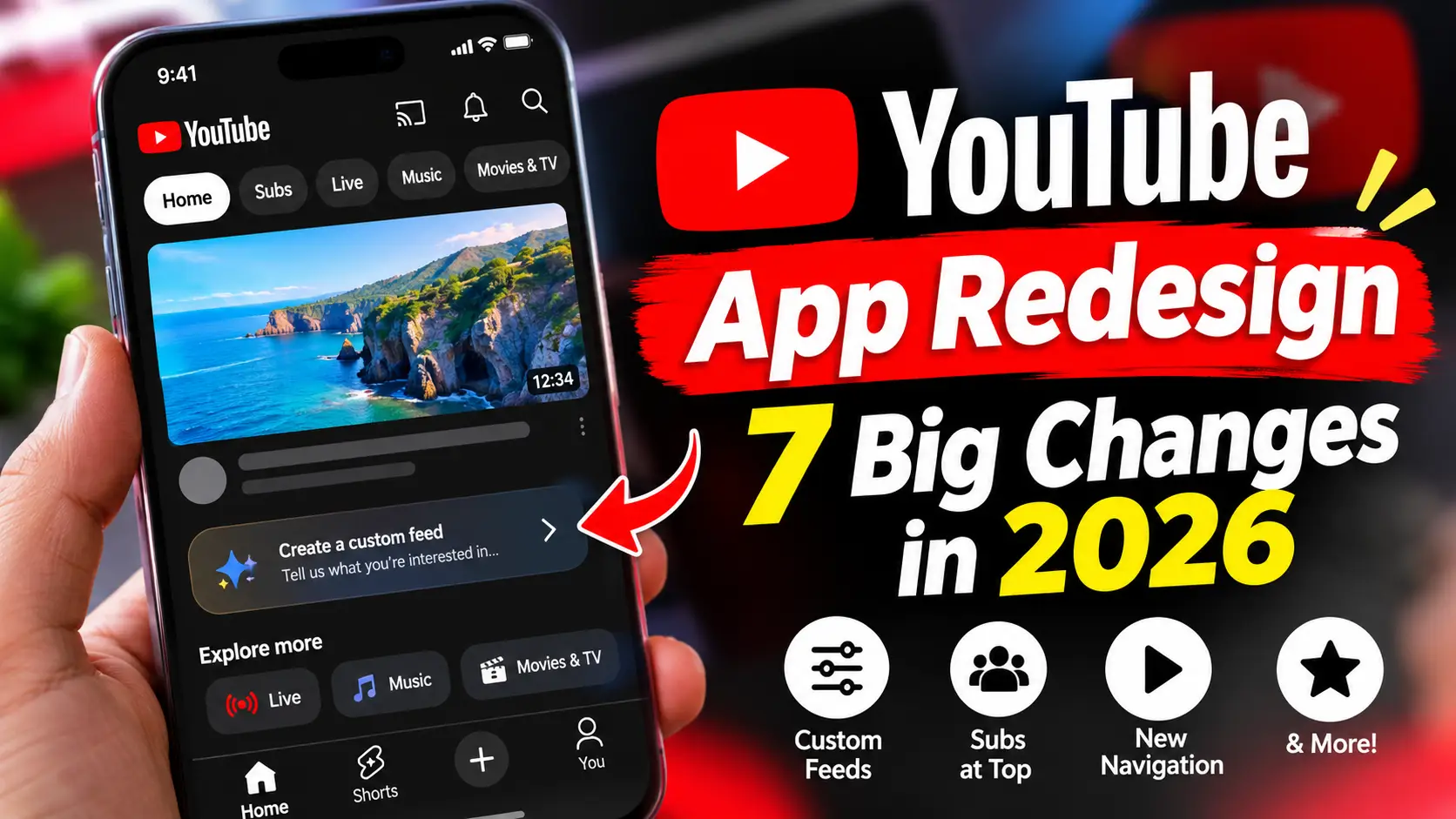
1. Custom Feeds Make Video Discovery More Personal
One of the biggest additions is Custom Feeds.
Instead of relying only on YouTube’s standard recommendations, users can describe the type of content they want to explore. YouTube then creates a personalized feed based on that prompt.
For example, users could create feeds around:
Formula 1 racing and motorsports.
Smartphone reviews and technology news.
Cooking tutorials and recipes.
Educational videos and science.
Travel destinations and documentaries.
This gives viewers another way to discover relevant videos without manually searching for every topic.
Custom Feeds are especially interesting because they make content discovery more interactive.
2. The Subscriptions Tab Moves to the Top
One of the most noticeable navigation changes involves the Subscriptions section.
Previously, users could access their subscriptions directly from the bottom navigation bar. In the redesigned experience, YouTube moves this option to a top-level navigation area under the name Subs.
This means viewers must adjust to a different way of reaching videos from their favorite creators.
Although the change may look minor, it could affect everyday usage for people who regularly open YouTube to watch newly uploaded videos from subscribed channels.
3. A Redesigned Bottom Navigation Bar
YouTube is also changing its familiar bottom navigation.
The redesigned experience features four main destinations:
Home: Discover recommended videos and personalized content.
Shorts: Explore short-form vertical videos.
Create: Access tools for uploading and creating content.
You: Find personal account information, history, playlists, and other settings.
The change simplifies the bottom navigation but removes the dedicated Subscriptions shortcut.
For regular viewers, this is one of the biggest adjustments they will notice.
4. Dedicated Feeds for Different Content Categories
The redesigned Home experience introduces additional ways to explore specific types of content.
These include:
Live: Find live broadcasts and streaming content.
Music: Explore music-related videos and content.
Movies & TV: Discover movies and television content.
Rather than navigating through multiple pages, users can explore different content categories directly from the Home experience.
Availability of some content, particularly Movies & TV, depends on regional availability and subscription eligibility.
5. More Control Over Personalized Recommendations
Custom Feeds give users another way to influence what they see.
For example, someone interested in technology could create a feed specifically for laptop launches, smartphone comparisons, and AI developments.
This makes YouTube’s discovery experience more flexible because users can describe their interests instead of relying entirely on broad recommendations.
However, Custom Feeds are not completely separate from YouTube’s recommendation system. Videos watched through them can enter regular watch history and influence future recommendations.
6. Custom Feeds Have Different Free and Premium Limits
Another important detail is that Custom Feeds have different limits depending on the account type.
According to YouTube’s Help Center documentation:
| Feature | Free accounts | Premium accounts |
|---|---|---|
| Active Custom Feeds | 3 | 8 |
| Personalized feeds | Yes | Yes |
| Saved feeds | Yes | Yes |
This gives Premium subscribers additional flexibility, although free users can still use the feature.
Users should also understand that Custom Feeds have certain requirements. YouTube currently documents English-language availability in the United States, and users need watch and search history enabled.
Read the official YouTube Custom Feeds guide for the latest requirements.
7. The New Interface Is Receiving Mixed Reactions
Not every change has received a positive response.
One of the main concerns is the removal of the dedicated Subscriptions button from the bottom navigation bar.
Many regular viewers are accustomed to opening YouTube and immediately checking new uploads from their favorite creators. Moving this option to the top changes that familiar experience.
Some users also question whether the redesigned navigation makes the app easier to use.
The new Custom Feeds feature offers additional flexibility, but the navigation changes may take time for existing users to accept.
Coverage from 9to5Google discusses the rollout and the reaction to the redesigned interface.
When Will the YouTube Redesign Be Available?
YouTube announced its new Home discovery experience on October 22, 2026. Subsequent reporting on November 5 described a wider rollout of the redesigned mobile interface across Android and iOS.
However, availability can vary between accounts and regions.
Custom Feeds have separate regional and language requirements. YouTube currently lists English-language availability in the United States, with plans to expand to additional regions.
This means users in the UK and other countries should not assume that every new feature is immediately available.
The rollout may also happen through server-side changes, so installing the latest version of the app does not necessarily guarantee access to every redesigned feature.
How to Get the New YouTube Experience
If the redesigned interface is available for your account, you can check it by following these steps:
Open the YouTube app on your Android or iPhone.
Make sure you are signed in to your Google account.
Visit the Home page.
Check whether the redesigned navigation and content categories appear.
Look for the Custom Feeds option if it is available for your account.
If you cannot see the new experience, it may not have reached your account or region yet.
You can also check the official YouTube Help Center for updated availability information.
Is the YouTube App Redesign Worth It?
The redesigned YouTube experience introduces some genuinely useful improvements, particularly Custom Feeds.
Being able to describe the content you want to watch and receive a dedicated feed could make discovering new videos easier. Dedicated content categories also offer another way to explore the platform.
However, moving Subscriptions away from the bottom navigation may frustrate viewers who regularly follow their favorite creators.
Ultimately, whether the redesign is an improvement depends on how people use YouTube.
For viewers who enjoy discovering new content, Custom Feeds could be a welcome addition. For those who primarily watch subscribed channels, the new navigation may require some adjustment.
Frequently Asked Questions
1. What is the YouTube App Redesign in 2026?
The YouTube App Redesign is a refreshed mobile experience that introduces Custom Feeds, updated Home navigation, and changes to the traditional bottom navigation bar.
2. Has YouTube removed the Subscriptions tab?
YouTube has moved the Subscriptions option from its traditional bottom navigation position to a top navigation area called Subs in the redesigned experience.
3. What are YouTube Custom Feeds?
Custom Feeds allow users to describe their interests and create personalized video feeds around specific subjects.
4. Are YouTube Custom Feeds free?
Yes. Free accounts can use Custom Feeds, with a limit of three active feeds. Premium accounts have a limit of eight.
5. Is the new YouTube redesign available on Android and iPhone?
The redesigned experience has been reported rolling out across Android and iOS. Availability can vary by account and region.
6. Is YouTube Custom Feeds available in the UK?
YouTube’s current documentation lists English-language availability in the United States. A wider international rollout is planned, but UK availability should be checked against the latest official documentation.
7. Why are users unhappy with the YouTube redesign?
Some users dislike the relocation of the Subscriptions option because it changes a familiar navigation shortcut. Others have concerns about the usability of the new layout.
Final Verdict
The YouTube App Redesign is an important change to how people discover and access content on the platform. Custom Feeds offer a more personalized discovery experience, while the updated navigation introduces a different way to access familiar sections.
Although some users may need time to adjust, the update shows that YouTube is continuing to experiment with how people interact with videos.
The real test will be whether these changes make everyday video discovery easier without making familiar features harder to access.