M6 MacBook Pro: 9 Powerful Upgrades, Specs and Price
Apple has introduced the new M6 MacBook Pro, bringing its latest Apple silicon technology to the 14-inch MacBook Pro lineup. The new laptop focuses on faster processing, improved graphics, on-device artificial intelligence (AI), enhanced wireless connectivity and longer battery life.
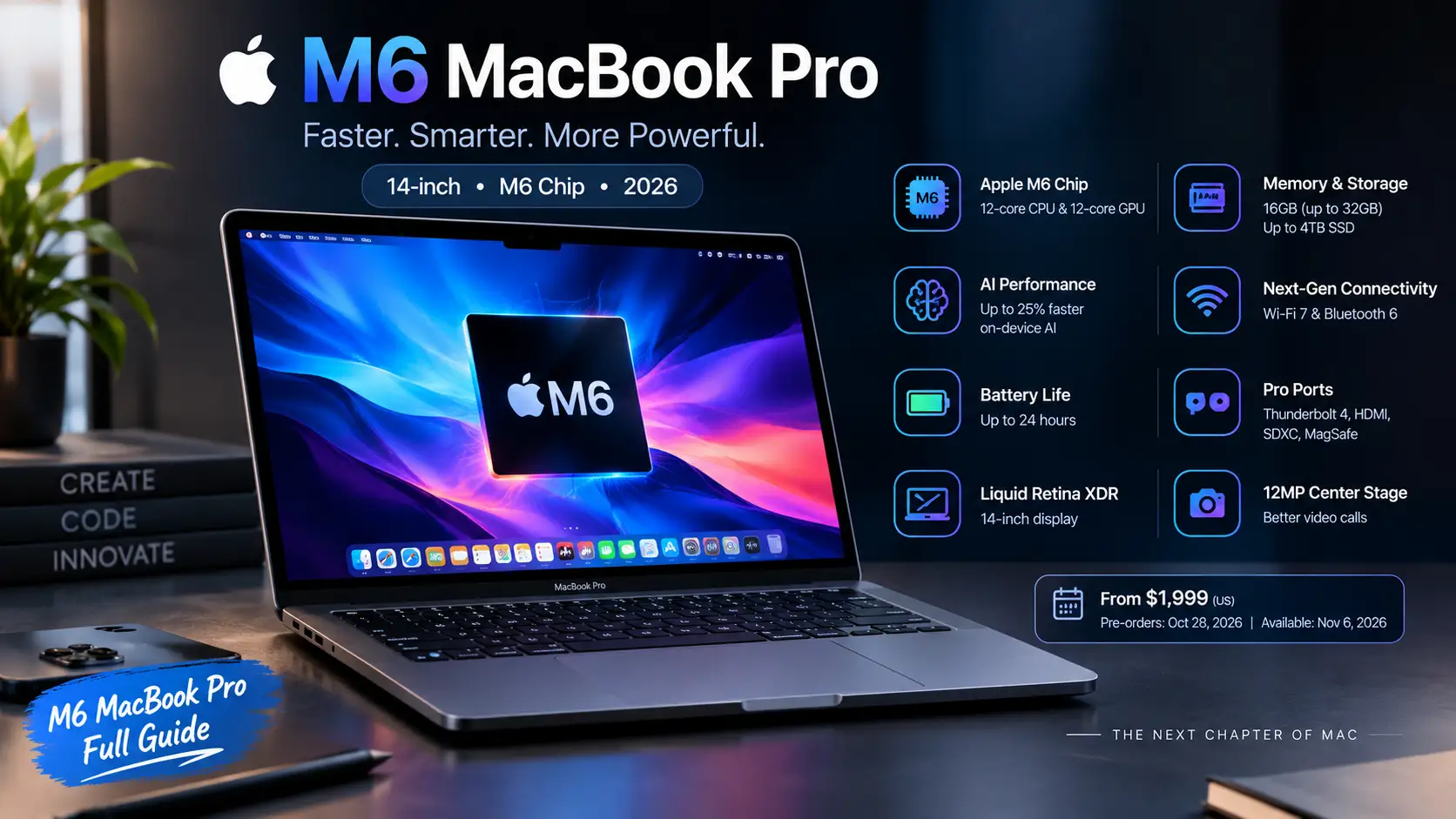
The M6 chip features a 12-core CPU and a 12-core GPU, while Apple claims up to 25% faster on-device AI performance compared with the previous M5 generation. The company also advertises up to 24 hours of battery life.
But what does the new MacBook Pro actually offer, how much does it cost, and is it worth considering for students, developers and professional creators?
Here is everything you need to know about the M6 MacBook Pro, including its specifications, features, performance claims, price and availability.
M6 MacBook Pro: Quick Overview
The new 14-inch MacBook Pro is designed for users who need more performance than a typical everyday laptop. Its upgraded processor, professional display and broad selection of ports make it suitable for demanding creative and productivity workloads.
| Feature | M6 MacBook Pro |
|---|---|
| Model | 14-inch MacBook Pro |
| Processor | Apple M6 |
| CPU | 12-core |
| GPU | 12-core |
| Neural Engine | Dual 16-core Neural Engine |
| Unified memory | 16GB standard, configurable up to 32GB |
| Memory bandwidth | Up to 170GB/s |
| Display | Liquid Retina XDR |
| Battery life | Up to 24 hours |
| Camera | 12MP Center Stage |
| Wireless connectivity | Wi-Fi 7, Bluetooth 6 |
| Operating system | macOS 27 |
| Colours | Space Black, Silver |
| US starting price | $1,999 |
These specifications are based on Apple’s announcement and published configuration information. Battery life and performance figures are manufacturer claims, not independent test results.
1. Apple M6 Chip: A More Powerful Processor
The biggest upgrade in the new MacBook Pro is its M6 processor. Apple has introduced a 12-core CPU, with two additional cores compared with the previous M5 configuration.
This matters because the processor handles the everyday operations that determine how responsive a computer feels. Opening applications, managing multiple tasks, compiling code and processing large projects all depend on CPU performance.
Apple also claims that the M6 delivers:
Up to 30% faster graphics performance compared with M5.
Up to 25% faster performance for on-device AI workloads.
Up to 1.9 times faster Neural Engine performance compared with M5.
These improvements could make the laptop particularly interesting for developers, designers and professionals who regularly work with demanding applications.
However, remember that real-world performance depends on the software, workload and configuration you choose.
2. Improved Graphics for Creative Professionals
The M6 MacBook Pro features a 12-core GPU with Neural Accelerators built into each GPU core.
Apple says its graphics performance is up to 30% faster than the previous M5 model. It also includes a third-generation ray-tracing engine and Dynamic Caching technology.
What does that mean in everyday use?
A stronger GPU can help with:
Editing high-resolution photographs.
Rendering 3D models and animations.
Working with visual effects.
Processing complex video projects.
Running supported graphics-intensive applications.
For creative professionals, the GPU upgrade could reduce waiting time during demanding workflows.
Nevertheless, the M6 is not automatically the right choice for every graphics-intensive task. Professionals should consider their software requirements, memory needs and workload before purchasing.
3. On-Device AI: One of the Biggest M6 Features
Artificial intelligence is becoming an important part of modern computing, and Apple is placing considerable attention on AI with the M6 MacBook Pro.
The new chip combines GPU Neural Accelerators with a Dual 16-core Neural Engine to support demanding AI workloads.
Apple specifically highlights local large language model (LLM) processing, AI-powered image generation and image upscaling.
This is important because on-device AI allows compatible workloads to run directly on the computer instead of relying entirely on remote cloud servers.
Potential advantages include:
Processing compatible AI tasks locally.
Reducing dependence on an internet connection for supported operations.
Keeping certain personal data on the device.
Accelerating compatible image-processing workflows.
Supporting local AI development and experimentation.
For developers interested in running local AI models, the M6 MacBook Pro could be an attractive option.
However, there is one important limitation: the standard model starts with 16GB of unified memory and can be configured up to 32GB. Large AI models can require significantly more memory.
Therefore, users planning to run demanding local LLMs should check the memory requirements of their preferred models before buying.
4. Liquid Retina XDR Display
Apple has retained its Liquid Retina XDR display technology in the new 14-inch MacBook Pro.
The display is designed for professionals who need accurate colours, strong contrast and high brightness when working with photographs, videos and other visual content.
Key display features include:
Liquid Retina XDR technology.
Up to 1,600 nits of peak HDR brightness.
A 1,000,000:1 contrast ratio.
Wide P3 colour support.
True Tone technology.
An optional nano-texture finish.
The nano-texture option is particularly useful for people who regularly work in bright environments because it reduces reflections and glare.
Photographers, video editors and designers may benefit from the display’s HDR capabilities and colour reproduction.
One important distinction: this standard M6 MacBook Pro uses a Liquid Retina XDR display. It is not the separate touchscreen OLED MacBook Pro model Apple has also announced.
5. Up to 24 Hours of Battery Life
Battery life is another major selling point.
Apple advertises up to 24 hours of battery life for the M6 MacBook Pro. That is an impressive claim for a laptop designed to handle professional workloads.
Longer battery life can be useful for:
Students attending classes.
Professionals travelling between meetings.
Developers working away from their desks.
Creators editing projects on the move.
People who prefer not to carry a charger everywhere.
However, the advertised figure should not be treated as a guaranteed result.
Actual battery life varies depending on screen brightness, applications, connected accessories, network activity and workload. Running demanding AI models or rendering video can consume considerably more power than light browsing.
The M6 MacBook Pro also supports fast charging. Apple says it can reach up to 50% charge in approximately 30 minutes when paired with a compatible higher-wattage power adapter, such as its 96W adapter.
6. RAM and Storage Options
Memory and storage are important considerations when choosing a professional laptop.
The M6 MacBook Pro starts with 16GB of unified memory, with configuration options reaching 32GB. Its memory bandwidth reaches up to 170GB/s.
Unified memory is shared between the CPU, GPU and other components. This design can help different parts of the chip access data efficiently.
For everyday productivity, 16GB may be sufficient. However, users working with multiple professional applications, large creative projects or local AI models should carefully consider whether 24GB or 32GB is more suitable.
Storage configurations include 1TB, 2TB and 4TB SSD options in the published configuration information.
Here is a practical way to think about the choices:
| Configuration | Best suited for |
|---|---|
| 16GB memory | Everyday productivity and general professional work |
| 24GB memory | Heavier multitasking and creative applications |
| 32GB memory | More demanding projects and compatible AI workloads |
| 2TB–4TB SSD | Large video, photography and project libraries |
Remember that unified memory and SSD storage serve different purposes. More storage does not replace the additional memory needed by demanding applications.
7. Wi-Fi 7, Bluetooth 6 and Professional Ports
The M6 MacBook Pro also improves its wireless connectivity.
Apple lists Wi-Fi 7 and Bluetooth 6 support, giving users access to newer wireless standards when paired with compatible networks and accessories.
The laptop includes a useful selection of physical connections:
Three Thunderbolt 4 ports.
HDMI.
MagSafe 3 charging.
SDXC card slot.
3.5mm headphone jack.
It also supports up to two external displays.
This selection is useful for photographers transferring files from memory cards, professionals connecting external monitors and creators using additional peripherals.
Having these connections built into the laptop can reduce the need to purchase separate adapters and hubs.
8. Camera, Speakers and macOS 27
The M6 MacBook Pro includes a 12MP Center Stage camera with Desk View support.
Center Stage helps keep users framed during compatible video calls, while Desk View can provide a view of the desk area.
Apple also includes a six-speaker sound system with Spatial Audio support and a studio-quality three-microphone array.
The laptop runs macOS 27, which brings Apple’s latest software features and Apple Intelligence capabilities to the device.
For users already working with an iPhone, Apple’s Continuity features can also help connect workflows across devices. Depending on the feature and device compatibility, users can transfer files, share content and hand off tasks between their Apple devices.
9. M6 MacBook Pro Price and Release Date
Apple announced the new 14-inch M6 MacBook Pro on October 27, 2026.
According to Apple’s official announcement, pre-orders began on October 28, with availability starting November 6.
US price
The official starting price in the United States is $1,999. Apple also lists a $1,899 starting price for eligible education customers.
The final price increases when you select additional memory, storage or other configuration options.
UK price
Current launch reporting lists a starting price of £1,999 in the United Kingdom. Buyers should confirm the final price and available configurations through Apple’s UK store before ordering.
Release details
| Detail | Information |
|---|---|
| Announcement date | October 27, 2026 |
| Pre-orders began | October 28, 2026 |
| Availability begins | November 6, 2026 |
| US starting price | $1,999 |
| UK reported starting price | £1,999 |
For the latest configuration and purchasing information, visit Apple’s official MacBook Pro page.
Is the M6 MacBook Pro Worth Buying?
The M6 MacBook Pro looks like a strong option for people who need a portable professional laptop with powerful processing, graphics and AI capabilities.
Its 12-core CPU, upgraded GPU, improved on-device AI performance and advertised 24-hour battery life make it an interesting upgrade for demanding users.
However, the right buying decision depends on your workload.
Consider the M6 MacBook Pro if:
You regularly edit photographs or videos.
You develop software or compile large projects.
You want to experiment with compatible local AI models.
You need a high-quality professional display.
You want a laptop with a wide range of built-in ports.
Think carefully before buying if:
You mainly browse the internet and use office applications.
You do not need professional-level graphics performance.
Your current laptop already handles your workload comfortably.
You need more than 32GB of unified memory.
For people with demanding workflows, the M6 MacBook Pro deserves serious consideration. For basic everyday computing, a less expensive MacBook may offer better value.
Frequently Asked Questions
1. When was the M6 MacBook Pro announced?
Apple announced the 14-inch M6 MacBook Pro on October 27, 2026. Pre-orders began October 28, and availability starts November 6.
2. What is the starting price of the M6 MacBook Pro?
The official US starting price is $1,999. Current launch reporting lists a UK starting price of £1,999.
3. How much RAM does the M6 MacBook Pro have?
It starts with 16GB of unified memory and can be configured with up to 32GB.
4. Does the M6 MacBook Pro support local AI?
Yes. Apple highlights support for compatible on-device AI workloads, including local LLM processing and AI-powered image generation. The models and applications you can run will depend on memory, software support and workload requirements.
5. How long does the M6 MacBook Pro battery last?
Apple advertises up to 24 hours of battery life. Actual results depend on how you use the laptop.
6. Does the M6 MacBook Pro have a touchscreen OLED display?
No. The standard 14-inch M6 model uses a Liquid Retina XDR display. Apple’s separately announced touchscreen MacBook Pro is a different product.
7. Is the M6 MacBook Pro good for video editing?
Its upgraded 12-core GPU, professional display and high-speed memory make it suitable for demanding video-editing workflows. Actual performance depends on the editing software, video format and project complexity.
8. Is the M6 MacBook Pro available in a 16-inch version?
Apple’s October 27 announcement covers the 14-inch M6 MacBook Pro. Do not assume a 16-inch M6 version is available unless Apple announces one.
Final Verdict
The M6 MacBook Pro brings together faster processing, improved graphics, stronger on-device AI capabilities, professional display technology and up to 24 hours of advertised battery life.
Its biggest attraction is not just the new processor. It is the combination of performance, connectivity and AI capabilities in a portable professional laptop.
If you are a developer, creator or professional who regularly handles demanding workloads, the new M6 model is worth examining. However, buyers should choose their memory and storage configuration carefully because those decisions can have a major impact on the laptop’s usefulness over time.
For the latest confirmed specifications and purchasing details, consult Apple’s official announcement.